在日常前端开发中,你是否遇到过这样的困境?生产环境下的 bug 在本地无法复现,移动端真机调试困难重重,或者需要快速验证代码片段却不想部署完整流程?
什么是 RemoteJS?
RemoteJS 是一个基于 Web 的远程 JavaScript 代码执行与调试工具。它允许开发者将 JavaScript 代码片段安全地注入到指定网页中执行,实时查看结果,并捕捉错误与日志,无需复杂的环境配置或部署流程。
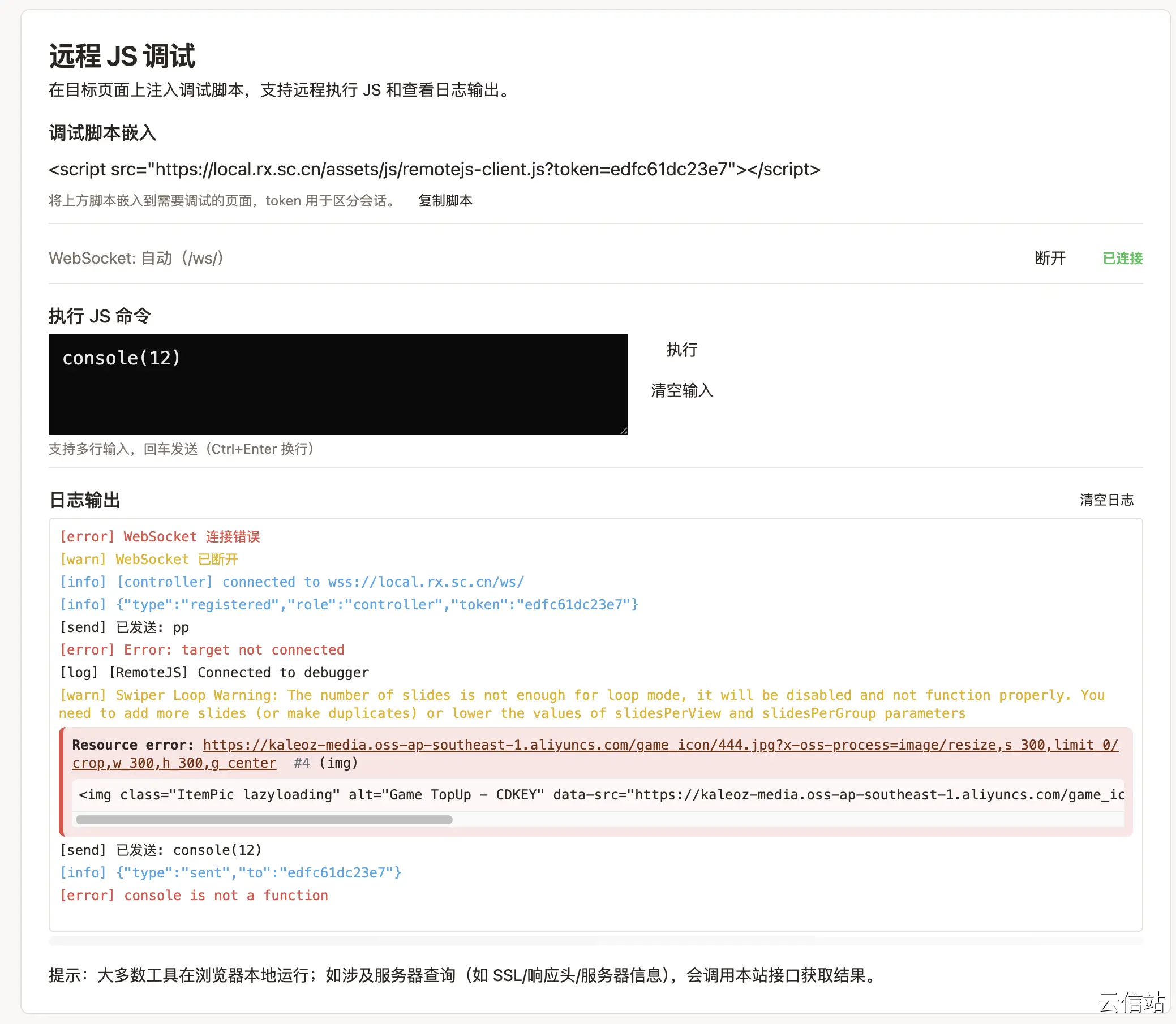
核心功能亮点
🔥 即时远程执行
- 一键注入:输入目标网页 URL,编写 JavaScript 代码,点击执行即可在远程页面中立即运行
- 实时反馈:在控制台中直接查看代码执行结果、console 输出和错误信息
- 无需安装:纯 Web 实现,无需安装浏览器插件或本地软件
🛡️ 安全可控
- 权限隔离:所有代码在沙箱环境中执行,不会影响原页面核心功能
- 来源限制:支持设置允许执行的域名白名单,防止未授权访问
- 代码审查:执行前可预览代码内容,确保安全可靠
📱 多场景适配
- 移动端调试:特别适合移动端 H5 页面调试,解决真机调试难题
- 跨域支持:轻松处理跨域页面的调试需求
- 第三方页面:对无源码的第三方页面进行功能测试与验证
使用说明
1. 快速开始
- 访问 https://rx.sc.cn/dev-tools/remotejs
- 在「目标页面URL」中输入要调试的网页地址
- 在代码编辑器中编写 JavaScript 代码
- 点击「执行」按钮,查看右侧控制台输出
2. 基础功能
- 代码编辑:支持 ES6+ 语法,提供基础语法高亮
- 执行控制:可随时停止代码执行
- 历史记录:自动保存最近执行的代码片段,方便重复使用
- 清除功能:一键清空控制台输出或编辑区代码
3. 高级技巧
- 调试函数:使用
console.log()、console.error() 输出调试信息
- DOM 操作:直接操作远程页面的 DOM 元素
- 样式修改:实时修改页面样式,预览效果
- 事件监听:为页面元素添加事件监听器,测试交互逻辑
六大使用场景
🐛 场景一:生产环境问题排查
痛点:用户反馈生产环境有 bug,但本地开发环境无法复现
解决方案:直接在用户遇到问题的页面注入诊断代码,快速定位问题
// 检查特定元素状态
const problemElement = document.querySelector('.problem-component');
console.log('元素状态:', {
  exists: !!problemElement,
  styles: problemElement ? getComputedStyle(problemElement) : null,
  dataAttrs: problemElement ? problemElement.dataset : null
});
📱 场景二:移动端真机调试
痛点:移动端页面在真机上表现异常,但 PC 端调试工具无法直接连接
解决方案:在手机中打开目标页面,通过 RemoteJS 注入调试代码
// 检测移动端触摸事件
document.addEventListener('touchstart', (e) => {
  console.log('触摸点:', e.touches[0].clientX, e.touches[0].clientY);
}, {passive: true});
🔗 场景三:跨域页面调试
痛点:无法直接对跨域 iframe 或第三方页面使用常规调试工具
解决方案:绕过跨域限制,安全地执行调试代码
// 检查 iframe 内容
const iframe = document.querySelector('iframe');
if (iframe) {
  console.log('iframe 尺寸:', {
    width: iframe.offsetWidth,
    height: iframe.offsetHeight
  });
}
🚀 场景四:快速原型验证
痛点:需要验证某个想法或效果,但不想修改源码重新构建
解决方案:直接在现有页面上试验新功能
// 快速添加新功能原型
const newButton = document.createElement('button');
newButton.textContent = '新功能测试';
newButton.style.cssText = 'position:fixed;top:20px;right:20px;z-index:9999';
newButton.onclick = () => alert('功能测试成功!');
document.body.appendChild(newButton);
🧪 场景五:A/B 测试与用户调研
痛点:需要临时调整页面内容进行用户调研
解决方案:非侵入式地修改页面展示,收集用户反馈
// 临时修改页面文案
const headings = document.querySelectorAll('h1, h2, h3');
headings.forEach(h => {
  const original = h.textContent;
  h.setAttribute('data-original-text', original);
  h.textContent = `[测试版] ${original}`;
});
🛠️ 场景六:教学与演示
痛点:在技术分享或教学时需要实时演示代码效果
解决方案:现场编写代码,实时展示运行结果,提升教学互动性
安全提示
- 仅在可信的网站和自己的开发环境中使用 RemoteJS
- 不要注入敏感信息或执行危险操作
- 注意代码可能对用户体验造成临时影响
- 刷新页面即可清除所有注入的代码
技术优势
- 轻量级:纯前端实现,加载快速
- 易集成:可嵌入团队内部工具平台
- 开源友好:代码结构清晰,支持二次开发
- 持续更新:根据开发者反馈不断优化功能
结语
RemoteJS 重新定义了前端调试的边界——无论代码在何处运行,调试都可以触手可及。它不仅是问题排查的工具,更是创意验证的沙盒、教学演示的舞台。
让调试突破环境束缚,让创意无需等待部署。 立即体验 RemoteJS,开启高效调试新篇章!
访问地址:https://rx.sc.cn/dev-tools/remotejs
适用对象:前端开发者、测试工程师、技术讲师、产品原型设计师
无需下载,打开即用 🚀
RemoteJS - 因为调试,本该如此简单